
teachwithict
  • Home
  • Teaching & Learning
    • Tools for Teachers >
      • Web 2.0 >
        • Top 10 Web 2.0 Tools
        • Classroom Response Tools
      • Quiz Tools
      • Classroom Management Tools
      • Software >
        • Media Conversion Tools
        • Application Software
      • Multimedia >
        • Free Music
    • Digital Leaders >
      • Digital Leaders Blog >
        • DL Archive
      • DL Tips
      • Quotes
      • Links
    • BYOD
    • Flipped Learning >
      • Flipped Classroom vs. Blended Classroom
    • Gamification >
      • Gamification vs. Game Based Learning vs. Game Design
    • Game Based Learning >
      • Minecraft >
        • Minecraft in Education
        • Minecraft Lesson Ideas
        • Minecraft Literacy
        • Minecraft Coding Tutorials >
          • Minecraft Code Builder Setup
          • Minecraft Code: Walking on Air
          • Minecraft Code: Hello World
          • Minecraft Code: Functions
          • Minecraft Code: Rainbow
          • Minecraft Code: Skyscraper
          • Minecraft Pixel Art
    • The magic of >
      • The magic of Computing
      • The magic of Maths
      • The magic of Science
      • The magic of Literacy
    • Breakout Edu
    • PLN Challenge >
      • Covering your backside
      • Twitter Challenge >
        • Challenge 1
        • Challenge 2
        • Challenge 3
        • Tips for staying safe on Twitter
        • Tips for hosting Edu Twitter Chats
        • Tips for taking part in Twitter chats
        • How to storify a chat
        • How to schedule Tweets
        • Twitter Lists
        • It's all about the hashtag! Essential chats for educators
      • Facebook Challenge >
        • Challenge 4
        • Challenge 5
        • Challenge 6
        • Tips for staying safe on Facebook
      • Google Challenge >
        • Challenge 7
        • Challenge 8
        • Challenge 9
      • Pinterest Challenge >
        • Challenge 10
        • Challenge 11
        • Challenge 12
        • Tips for using Pinterest
      • Blog Challenge >
        • Challenge 13
        • Challenge 14
        • Challenge 15
        • How to create a classroom blog
      • Staffrm Challenge >
        • Challenge 16
        • Challenge 17
        • Challenge 18
      • Skype Challenge >
        • Challenge 19
        • Challenge 20
        • Challenge 21
      • Edmodo Challenge >
        • Challenge 22
        • Challenge 23
        • Challenge 24
      • TeachMeet Challenge >
        • Challenge 25
        • Challenge 26
        • Challenge 27
      • In-school challenge >
        • Challenge 28
        • Challenge 29
        • Challenge 30
      • 30 ways to grow your PLN
    • T&L Blog
  • Computing
    • Computing Blog >
      • GCSE Computer Science
      • General
    • CPD >
      • Blocks to Code
      • Tutorials >
        • How to embed Flash into PowerPoint
        • How to embed YouTube videos in to PowerPoint
        • How to create a wiki
        • How to create a classroom blog
    • Teaching Computer Science >
      • Schemes of Work
      • Programming Resources
      • Theory
      • Posters
    • Theory Lessons >
      • Theory Tests
      • Computer Hardware >
        • Input / Output
        • CPU
        • LMC
        • Storage Devices
        • Memory (RAM / ROM)
      • Binary Lessons >
        • Units of Data
        • Binary Representation
        • Binary Representation of Images
        • Binary Representation of Characters
        • Binary Representation of Sound
        • Binary Representation of Instructions
        • Binary Addition
        • Hexadecimal
      • Software >
        • Operating System
        • Types of Software
        • Utility Software
      • Programming >
        • Flowcharts
    • Game Design
    • App Creation
    • Digital Literacy >
      • Social Media (Good or Bad thing?)
      • Cyberbullying
      • Staying Safe Online
    • ICT Strand >
      • Spreadsheet Modelling
      • Superhero Movie Trailer
      • PowerPoint Task
      • Paint 3D Tutorial
    • Programming Lessons >
      • Microbit >
        • Magic 8 Ball
        • Harry Potter Sorting Hat
        • Music
        • Music (Festive)
        • Quick Start Guide
        • Microbit Simulator
      • TouchDevelop >
        • TouchDevelop Challenge
        • Scheme of Work
        • TouchDevelop Lessons >
          • 8 bit challenge
          • Turing Test
          • Turtle Power
          • 8 Ball
          • Under the hood
        • Tutorials
      • Raspberry Pi >
        • Networking the Pi
        • Minecraft Pi
        • Harry Potter Sorting Hat >
          • Harry Potter Sorting Hat (GPIO)
        • Raspberry Pi LTSP (Networked Classroom)
        • Astro Pi
      • Scratch
      • Python >
        • Chatbot
        • Coding Golf
        • Magic 8 ball
        • Python Mad Libs
        • Shakespearean Insult Generator >
          • Shakespearean Insult Generator Part 2
        • Sorting Hat
      • Little Man Computer
      • Hour of Code >
        • HoC 8-Bit Challenge
  • 21 Things
  • Microbit
    • Physical Computing >
      • micro:bit LEDs
  • About
  • Blog
  • Home
  • Teaching & Learning
    • Tools for Teachers >
      • Web 2.0 >
        • Top 10 Web 2.0 Tools
        • Classroom Response Tools
      • Quiz Tools
      • Classroom Management Tools
      • Software >
        • Media Conversion Tools
        • Application Software
      • Multimedia >
        • Free Music
    • Digital Leaders >
      • Digital Leaders Blog >
        • DL Archive
      • DL Tips
      • Quotes
      • Links
    • BYOD
    • Flipped Learning >
      • Flipped Classroom vs. Blended Classroom
    • Gamification >
      • Gamification vs. Game Based Learning vs. Game Design
    • Game Based Learning >
      • Minecraft >
        • Minecraft in Education
        • Minecraft Lesson Ideas
        • Minecraft Literacy
        • Minecraft Coding Tutorials >
          • Minecraft Code Builder Setup
          • Minecraft Code: Walking on Air
          • Minecraft Code: Hello World
          • Minecraft Code: Functions
          • Minecraft Code: Rainbow
          • Minecraft Code: Skyscraper
          • Minecraft Pixel Art
    • The magic of >
      • The magic of Computing
      • The magic of Maths
      • The magic of Science
      • The magic of Literacy
    • Breakout Edu
    • PLN Challenge >
      • Covering your backside
      • Twitter Challenge >
        • Challenge 1
        • Challenge 2
        • Challenge 3
        • Tips for staying safe on Twitter
        • Tips for hosting Edu Twitter Chats
        • Tips for taking part in Twitter chats
        • How to storify a chat
        • How to schedule Tweets
        • Twitter Lists
        • It's all about the hashtag! Essential chats for educators
      • Facebook Challenge >
        • Challenge 4
        • Challenge 5
        • Challenge 6
        • Tips for staying safe on Facebook
      • Google Challenge >
        • Challenge 7
        • Challenge 8
        • Challenge 9
      • Pinterest Challenge >
        • Challenge 10
        • Challenge 11
        • Challenge 12
        • Tips for using Pinterest
      • Blog Challenge >
        • Challenge 13
        • Challenge 14
        • Challenge 15
        • How to create a classroom blog
      • Staffrm Challenge >
        • Challenge 16
        • Challenge 17
        • Challenge 18
      • Skype Challenge >
        • Challenge 19
        • Challenge 20
        • Challenge 21
      • Edmodo Challenge >
        • Challenge 22
        • Challenge 23
        • Challenge 24
      • TeachMeet Challenge >
        • Challenge 25
        • Challenge 26
        • Challenge 27
      • In-school challenge >
        • Challenge 28
        • Challenge 29
        • Challenge 30
      • 30 ways to grow your PLN
    • T&L Blog
  • Computing
    • Computing Blog >
      • GCSE Computer Science
      • General
    • CPD >
      • Blocks to Code
      • Tutorials >
        • How to embed Flash into PowerPoint
        • How to embed YouTube videos in to PowerPoint
        • How to create a wiki
        • How to create a classroom blog
    • Teaching Computer Science >
      • Schemes of Work
      • Programming Resources
      • Theory
      • Posters
    • Theory Lessons >
      • Theory Tests
      • Computer Hardware >
        • Input / Output
        • CPU
        • LMC
        • Storage Devices
        • Memory (RAM / ROM)
      • Binary Lessons >
        • Units of Data
        • Binary Representation
        • Binary Representation of Images
        • Binary Representation of Characters
        • Binary Representation of Sound
        • Binary Representation of Instructions
        • Binary Addition
        • Hexadecimal
      • Software >
        • Operating System
        • Types of Software
        • Utility Software
      • Programming >
        • Flowcharts
    • Game Design
    • App Creation
    • Digital Literacy >
      • Social Media (Good or Bad thing?)
      • Cyberbullying
      • Staying Safe Online
    • ICT Strand >
      • Spreadsheet Modelling
      • Superhero Movie Trailer
      • PowerPoint Task
      • Paint 3D Tutorial
    • Programming Lessons >
      • Microbit >
        • Magic 8 Ball
        • Harry Potter Sorting Hat
        • Music
        • Music (Festive)
        • Quick Start Guide
        • Microbit Simulator
      • TouchDevelop >
        • TouchDevelop Challenge
        • Scheme of Work
        • TouchDevelop Lessons >
          • 8 bit challenge
          • Turing Test
          • Turtle Power
          • 8 Ball
          • Under the hood
        • Tutorials
      • Raspberry Pi >
        • Networking the Pi
        • Minecraft Pi
        • Harry Potter Sorting Hat >
          • Harry Potter Sorting Hat (GPIO)
        • Raspberry Pi LTSP (Networked Classroom)
        • Astro Pi
      • Scratch
      • Python >
        • Chatbot
        • Coding Golf
        • Magic 8 ball
        • Python Mad Libs
        • Shakespearean Insult Generator >
          • Shakespearean Insult Generator Part 2
        • Sorting Hat
      • Little Man Computer
      • Hour of Code >
        • HoC 8-Bit Challenge
  • 21 Things
  • Microbit
    • Physical Computing >
      • micro:bit LEDs
  • About
  • Blog
Search by typing & pressing enter

YOUR CART

#connectED challenge
​
Challenge 4: Add a teacher as a friend on facebook

Reading Time: 5 minutes.

​Click on the image below to let your followers know you've earned this badge!

Picture
​​Normally, just the mention of the name ‘Facebook’ induces fear in many teachers, particularly SLT. We’ve all heard the stories of how teachers have fallen foul of websites such as Facebook and MySpace with some extreme cases resulting in dismissal. However, with some simple precautions, Facebook can be a powerful tool for connecting and sharing with other educators. 
​
By far the simplest way to become connected on Facebook is to become friends with other educators.
Picture
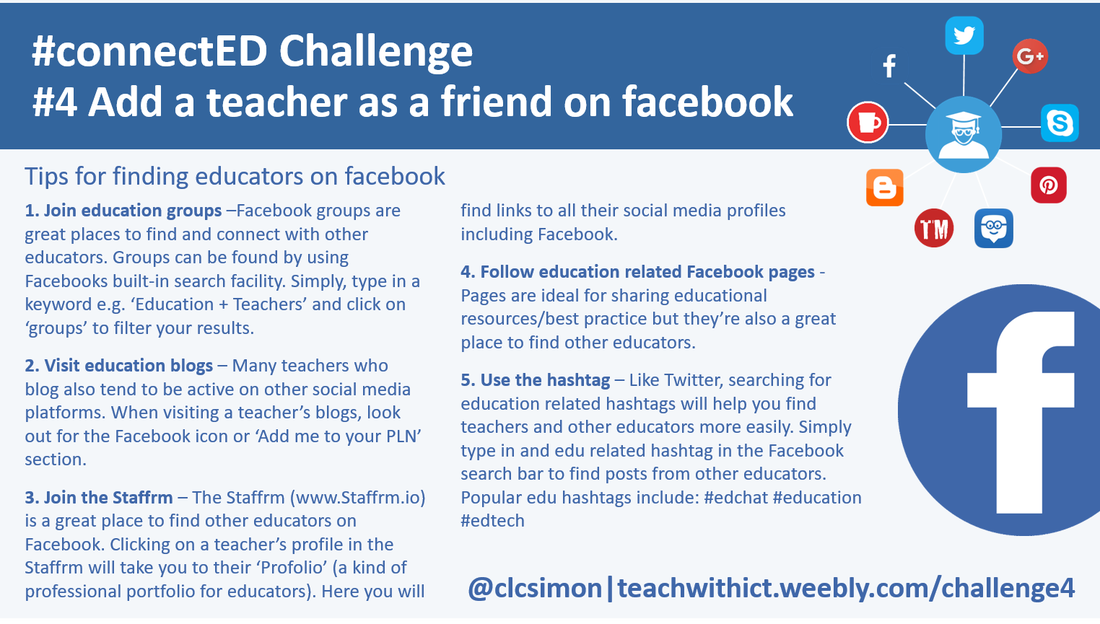
Tips for finding educators on Facebook (Crib Sheet)
How to find other educators on Facebook

Here are some simple tips for finding other educators on Facebook:
  • Join education groups – As well as being a great place to find and share great resources/ideas, education related Facebook groups are also a great place to find and connect with other educators. Groups can be found by using Facebooks built-in search facility. Click on the search icon (top right hand corner of the Facebook toolbar) and type in a keyword e.g. ‘Education’ + ‘Teachers’ etc. Facebook will return a list of results based on your keywords. Once here, you can refine your search by clicking on the ‘Groups’ link.
  • Visit education blogs – Many teachers who blog also tend to be active on other social media platforms such as Twitter, Facebook, Pinterest etc. When visiting a teacher’s blogs, look out for the Facebook icon or ‘Add me to your PLN’ section.
  • Join the Staffrm – The Staffrm (www.Staffrm.io) is a great place to find other educators on Facebook. Clicking on a teacher’s profile in the Staffrm will take you to their ‘Profolio’ (a kind of professional portfolio for educators). Here you will find, if they have one, a link to their education Facebook account.
  • Follow education related Facebook pages - Pages are ideal for sharing educational resources/best practice but they’re also a great place to find other educators. Once you’ve found an edu page, simply scroll through the posts to find comments from other educators.
  • Use the hashtag – Just like Twitter, searching for education related hashtags will help you find teachers and other educators more easily. Simply type in and edu related hashtag in the Facebook search bar to find posts from other educators. Popular edu hashtags include: #edchat #education #edtech


Tips

As mentioned in my opening paragraph, Facebook is not without its pitfalls however, with some simple precautions, Facebook can be a powerful tool for connecting with other educators. Here are some useful tips for keeping your professional and pedagogical Facebook accounts separate:
  • Create a Teacher profile - Creating a separate profile for teaching is an easy way to separate your professional and personal life on Facebook. If using Facebook in the classroom, it will also prevent students from seeing your personal information.
  • Create an education Facebook page – Facebook pages are essentially separate profiles, separate from your personal account, which allow you to collate and share resources making them perfect for sharing classroom resources!
  • Make sure your settings are set to private – This is something we often tell our students but is sometimes neglected by teachers. If you’re going to use your personal profile to connect with other educators on Facebook, and I see this quite a lot, make sure you have your account set to friends only. This can help avoid potentially embarrassing/awkward interactions.
​

Useful links:
  • http://www.edudemic.com/every-teachers-must-have-guide-to-facebook/ - Useful guide for any teacher who uses Facebook.
  • http://teachwithict.weebly.com/tips-for-staying-safe-on-facebook.html - Tips for using Facebook safely.
  • http://www.facebook.com/education - A Facebook page for information about how educators can best use Facebook.
  • http://www.teachertoolkit.me/2016/01/15/top-tips-to-keep-teachers-safe/ – Top tips to keep teachers safe on social media courtesy of Ross Morrison McGill (aka @TeacherToolkit)
  • https://www.facebook.com/help/325807937506242/ - Facebook help centre containing guides for managing your privacy settings.
  • https://www.scribd.com/doc/16957158/Teacher-s-Guide-to-Using-Facebook-Read-Fullscreen - A teacher's guide to Facebook by Bernadette Rego.

Picture
Powered by Create your own unique website with customizable templates.
